Invoices
The Invoice Manager within the Cloud Management Portal provides a centralized interface for viewing, managing, and exporting your cloud usage invoices. Whether you're tracking usage for a specific billing period, filtering invoice statuses, or exporting financial records, this module gives you full control over your billing lifecycle.
Navigating to Invoice Manager
-
Log in to the Cloud Management Portal.
-
From the left-hand navigation menu, go to Billing > Invoices.
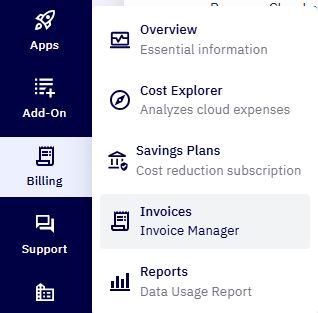
- You will be taken to the Invoice Manager page.
Invoice Table Overview
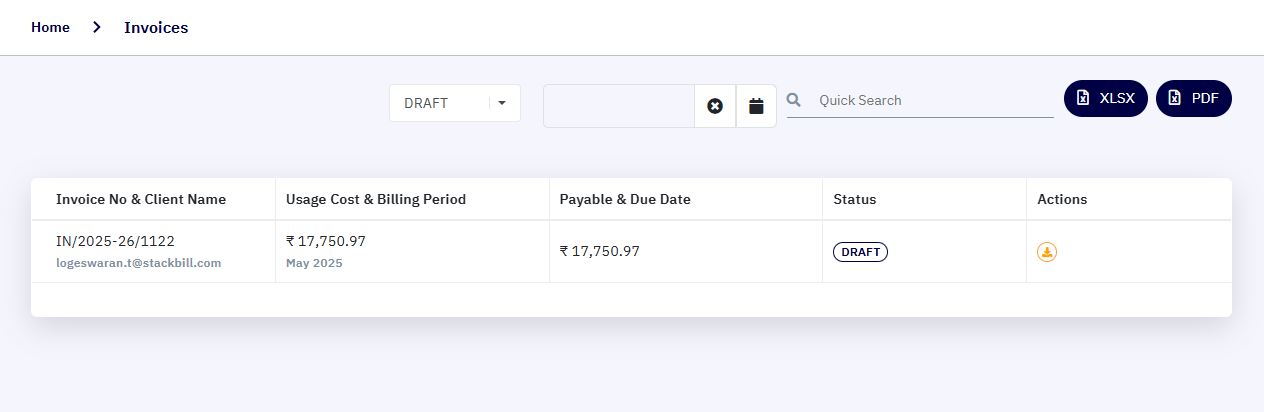
The invoice table displays a list of all generated invoices with key details:
| Column | Description |
|---|---|
| Invoice No & Client Name | The unique invoice number and associated client email or account name. |
| Usage Cost & Billing Period | The total usage cost and the billing period (e.g., May 2025). |
| Payable & Due Date | The amount payable and the invoice due date. |
| Status | Current status of the invoice (e.g., DRAFT, DUE, PAID, OVER_DUE, CANCEL). |
| Actions | Available actions such as downloading. |
Invoice Filtering Options
At the top of the table, you’ll find tools to filter and search invoices:
1. Status Drop-down :
Use the drop-down to filter invoices by their current status:
-
All Status: Show all invoices.
-
DRAFT: Invoice is still being prepared and not yet finalized.
-
DUE: Payment is due but not overdue.
-
OVER_DUE: Payment is overdue.
-
PAID: Invoice has been fully paid.
-
CANCEL: Invoice was cancelled or voided.
2. Date Filter :
- Use the calendar icon to filter invoices based on the billing period or due date range.
3. Quick Search :
- Search invoices by invoice number, client name, or keywords.
4. Export Options :
You can export invoice data for reporting or compliance:
-
XLSX: Download the invoice list in Excel format.
-
PDF: Download invoices in printable PDF format.
These options are located in the upper right corner of the Invoice Manager screen.
Invoice Status Descriptions
| S. No | Status | Meaning |
|---|---|---|
| 1 | DRAFT | Invoice is created but not yet issued. Editable by the billing admin. |
| 2 | DUE | Invoice is issued and payment is due within the stated timeline. |
| 3 | OVER_DUE | Payment was not received by the due date. Requires urgent attention. |
| 4 | PAID | Invoice has been fully settled. |
| 5 | CANCEL | Invoice has been voided and is no longer valid. |