Kubernetes
The Kubernetes Marketplace is a dedicated section within the admin portal that provides users with access to a variety of applications and services specifically designed to run on Kubernetes clusters. This marketplace facilitates the deployment and management of containerized applications, making it easier for administrators and developers to leverage Kubernetes for their operational needs.
The Kubernetes Marketplace serves as a centralized hub where users can discover, deploy, and manage applications tailored for Kubernetes environments. It offers a range of pre-packaged solutions, including databases, middleware, and other essential services, simplifying the process of building and scaling applications on Kubernetes.
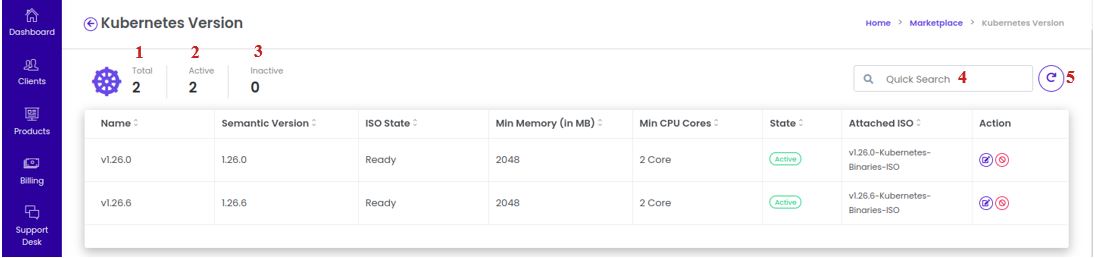
Kubernetes List Page :
The main components of the kubernetes List Page are elaborated upon below:
1. Total Number of Kubernetes Versions :
- This feature displays the total count of all Kubernetes versions available in the system, regardless of their active or inactive status. It provides an overview of the number of Kubernetes versions being supported and managed.
2. Number of Active Kubernetes Versions :
- This section shows the total count of active Kubernetes versions that are currently in use and available for deploying Kubernetes clusters. These active versions are fully operational and can be selected during the cluster setup process.
3. Number of Inactive Kubernetes Versions :
- This section provides the total count of inactive Kubernetes versions. These versions are no longer in use or available for new deployments. However, they may still be visible for reference, especially if older clusters are running on these versions. Inactive versions may be phased out or retained for compatibility purposes.
4. Kubernetes Version Quick Search Field :
- The quick search field allows administrators to quickly locate a specific Kubernetes version by typing its name, version number, or other identifying information. This feature speeds up the process of navigating through a large list of available versions.
5. Refresh the Page :
- The refresh page icon ensures that the list of Kubernetes versions displayed is up-to-date. By clicking this icon, administrators can refresh the page and retrieve any changes or updates that may have occurred, such as the addition of new versions or updates to existing ones.
Edit Kubernetes Version :
The Edit Kubernetes Version Description feature within the admin portal allows administrators to modify the description associated with a specific Kubernetes version. This description helps provide context or additional details about the version, such as any notable updates, compatibility information, or recommended use cases.
1. Navigate to the Kubernetes :
-
Login into the admin portal.
-
From the portal menu, select the Marketplace icon.
-
Next, select the Kubernetes icon to view a list of all the versions of Kubernetes that are available.
2. Select Kubernetes Version :
-
From the list of Kubernetes versions, locate the version for which you wish to update the description.
-
Use the "Action" menu associated with the version and choose the Edit option.
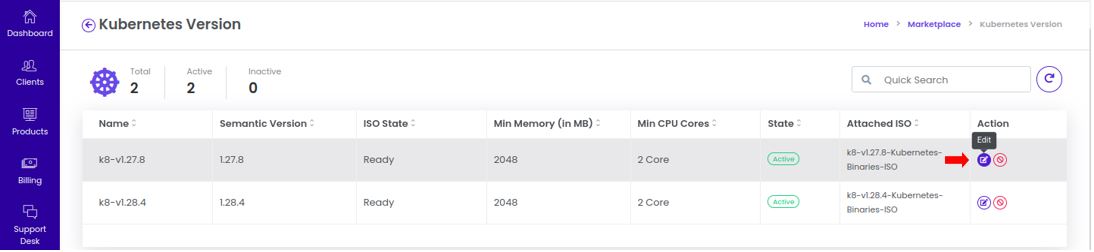
3. Edit Action :
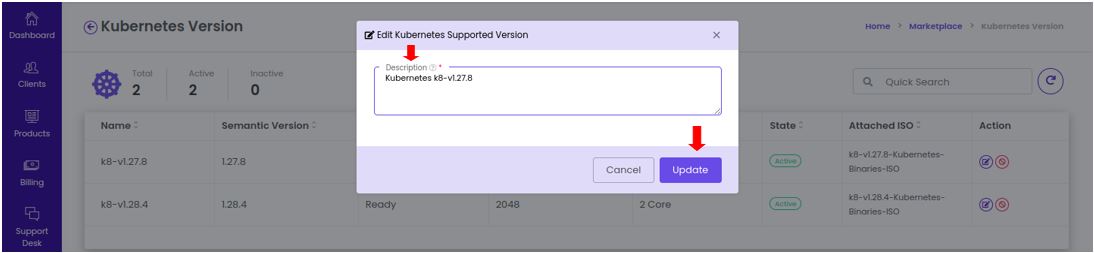
- Upon selecting the Edit option, you will be directed to a page where you can update the description of the selected Kubernetes version.
4. Update and Save :
- After making the necessary changes to the version description, click the Update button to save the modifications.
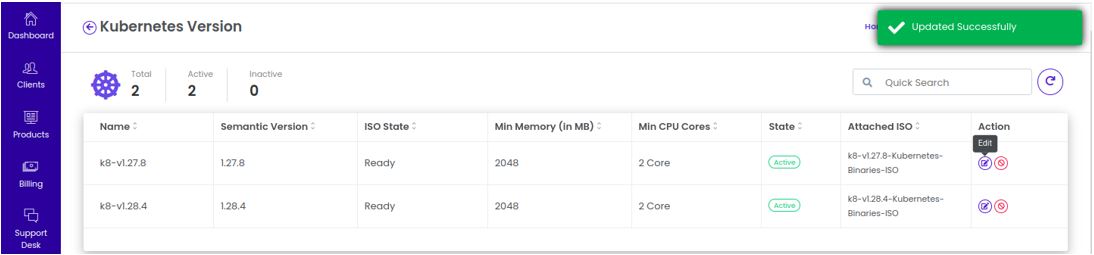
- The description will be updated and can be viewed by others within the system when they access the details of that particular Kubernetes version.
Enable/Disable Kubernetes Version :
The Enable/Disable Kubernetes Version feature within the admin portal allows administrators to control the availability of specific Kubernetes versions within their marketplace. This function is crucial for managing which Kubernetes versions are accessible for new deployments, ensuring that only the desired or supported versions are available for use.
1. Navigate to the Kubernetes :
-
Login into the admin portal.
-
From the portal menu, select the Marketplace icon.
-
Next, select the Kubernetes icon to view a list of all the versions of Kubernetes that are available.
2. Select the Kubernetes Version :
- Locate the specific Kubernetes version that you wish to enable or disable from the list.
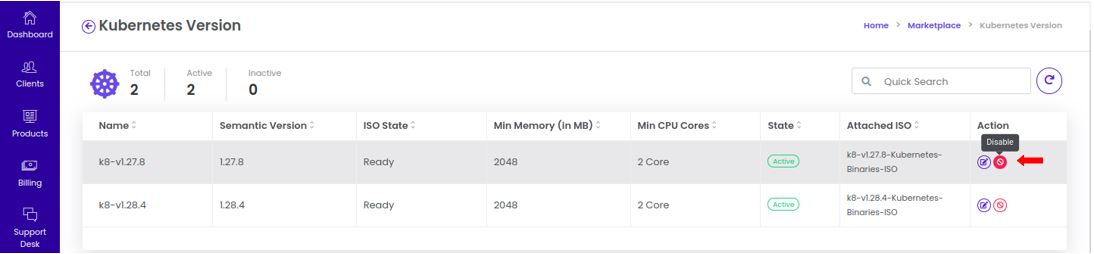
3. Choose Enable/Disable Option :
-
In the Action menu, select either Enable or Disable, depending on the current status of the Kubernetes version.
-
Enable: If the Kubernetes version is currently disabled and you want to make it available for use.
-
Disable: If the Kubernetes version is currently enabled and you want to make it unavailable for new deployments.
-
-
This action determines whether this Kubernetes version is visible and usable for the creation of new clusters or virtual machines.
4. Confirm Action :
-
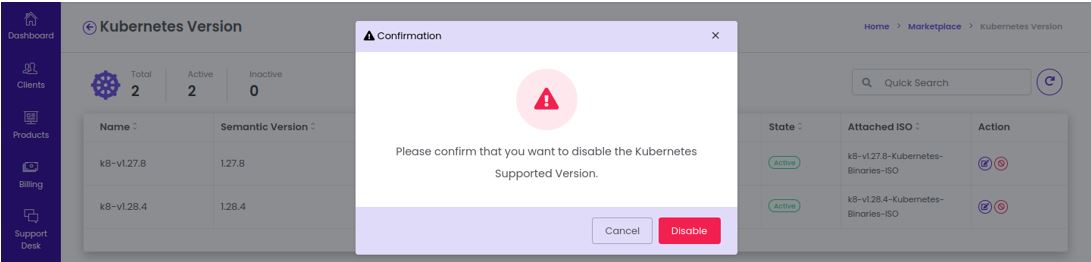
After selecting Enable or Disable, a confirmation prompt will appear.
-
Confirm the action by clicking the Enable/Disable button. This ensures that the action is intentional and prevents accidental changes.
5. Kubernetes Version Status Updated :
-
Once confirmed, the Kubernetes version’s status will be updated accordingly:
- Enabled: The version is now active and can be used in the marketplace.
- Disabled: The version is inactive and hidden from users, preventing new deployments from using this version.

- You will receive a success notification indicating that the Kubernetes version has been enabled or disabled successfully.